
One thing industry reports and security analysts keep agreeing on is that, despite our best efforts, the human element is still the single biggest source of risk for organizations. Verizon’s 2026 DBIR found the human element involved in 62% of breaches. CrowdStrike reported a 563% increase in incidents using fake CAPTCHA lures, and Microsoft saw thousands of devices a month hit by ClickFix attacks.
The data suggests that sometimes the easiest way around our security controls is to get the user to run the attack themselves. Increasingly, the browser is where that happens. That is why two approaches have emerged to add protection directly at the browser: remote browser isolation (RBI) and the secure enterprise browser.
This post breaks down how each one actually works, the security problem each is designed to solve, and where they fit in a modern security architecture.
RBI vs Secure Enterprise Browser at a Glance
Both technologies protect the browser, but they come at it from opposite directions:
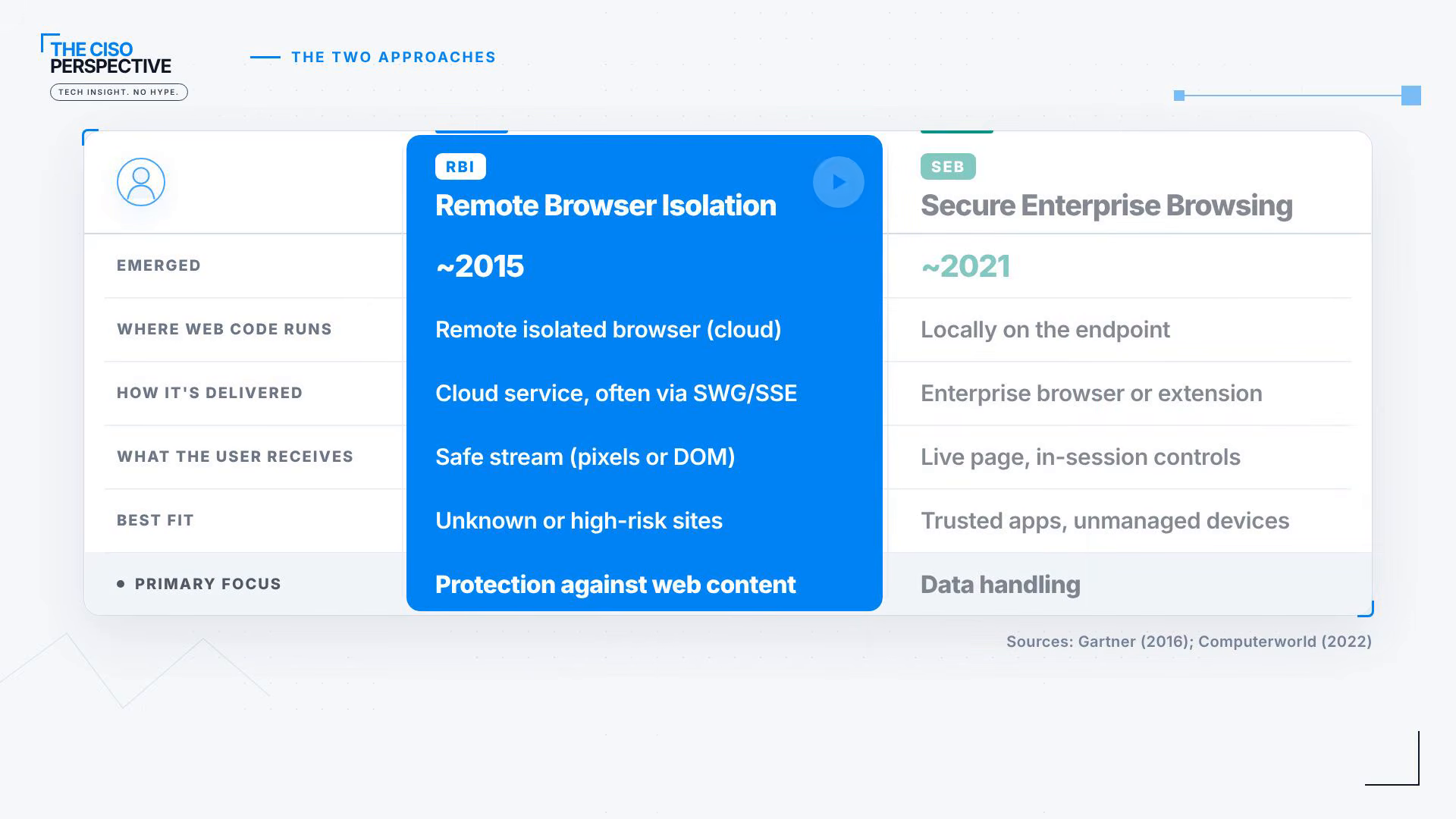
- Remote browser isolation moves potentially dangerous web activity off the endpoint entirely. The website runs in an isolated environment, typically in the cloud, so malicious code never executes on the user’s machine. Commercial platforms started appearing around 2015.
- A secure enterprise browser is the newer idea. The browser and the web content still run on the endpoint, but security controls are built into every browser session.
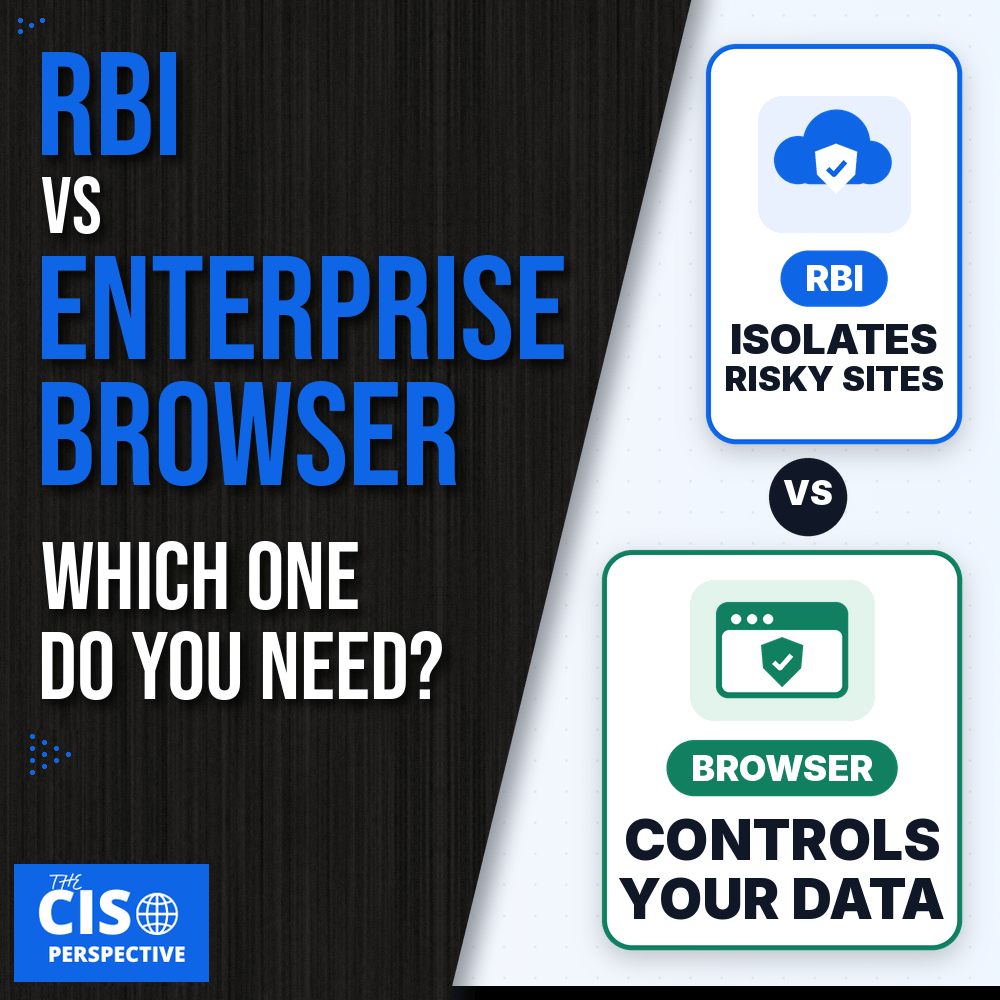
Put simply, RBI is about isolating malicious web content from the endpoint, while secure browsing is about controlling what happens inside the browser session.
How Remote Browser Isolation (RBI) Works
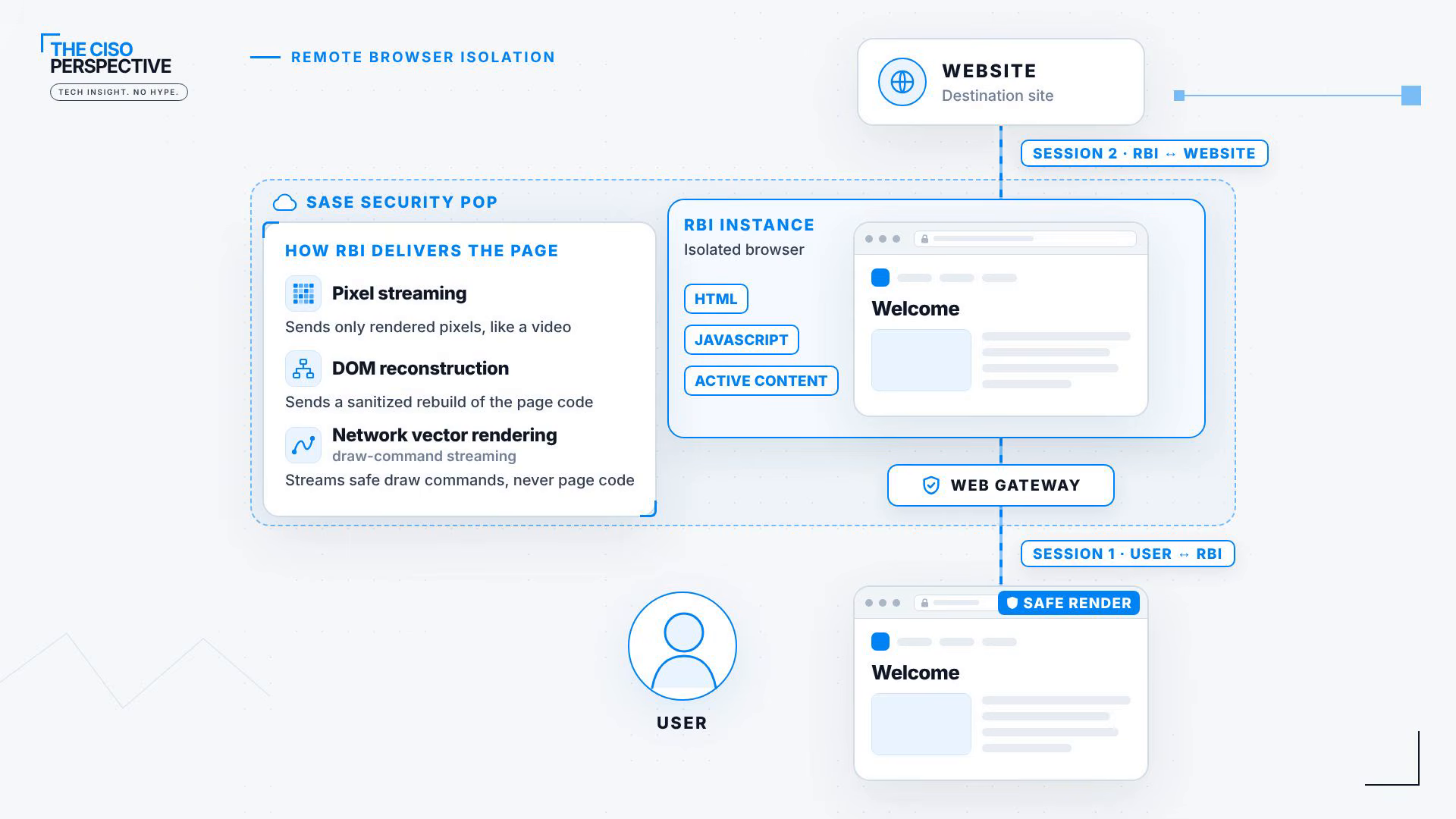
RBI typically involves three parties: the user, the RBI instance in the cloud, and the website the user is trying to reach.
- The user navigates to a site that needs to be isolated, and the request is redirected to the remote browser instance.
- The RBI instance connects to the website on the user’s behalf. It retrieves the site and executes the HTML, JavaScript and other active content remotely.
- The user never receives that active content. Instead, the RBI platform sends back a safe representation of the page.
How that safe representation is built depends on the platform:
- Pixel streaming sends only rendered pixels, similar to a remote desktop or VDI session.
- DOM reconstruction sends a sanitized rebuild of the page code.
- Network vector rendering streams safe drawing commands to the browser, never the page code itself.
From the user’s point of view, nothing changes. They click and type as usual, those inputs go to the remote browser, the RBI instance interacts with the website, and the result is presented back safely.
Why RBI Is Applied Selectively
Running a remote browser session for every website is resource intensive and can get expensive. That is why RBI is usually integrated with a secure web gateway (SWG) or SASE platform and applied selectively:
- Known and trusted sites load normally, directly from the user to the website.
- Unknown or higher-risk sites are redirected to the RBI instance.
When a user clicks a potentially malicious link, the site still loads, the JavaScript still executes and the user still interacts with it. The difference is that all of it happens inside the isolated browser instead of on the endpoint. If the site tries to exploit the browser or deliver malware, that code stays inside the isolated instance. When the session ends, the environment is destroyed along with anything the site tried to run.
That is the real security value of RBI: users can interact with risky websites while the active content stays away from the endpoint, which dramatically reduces the risk that simply visiting a malicious site turns into a compromise.
How a Secure Enterprise Browser Works
Secure enterprise browsing takes a different approach. Instead of moving the session somewhere else, the browser and web content keep running locally on the user’s machine. What changes is that security controls are enforced inside the browser session itself.
Vendors implement this in one of two ways: a dedicated enterprise browser or a browser extension that adds controls to the browser people already use. Either way, the advantage of enforcing security inside the browser is context. The platform can see which applications the user is accessing, which accounts they are using and what data is moving back and forth. That gives organizations visibility, and a level of control, that they would not get from network traffic alone.
Policy Controls Inside the Browser Session
With that context, policy can control actions such as:
- Copy and paste
- File uploads and downloads
- Printing
- Screenshots and screen capture
- Entering corporate credentials on an unapproved site
Policy can also change with the user and the device. An employee on a managed laptop might get full access to an application, while a contractor on a personal device can reach the same application with restricted capabilities, such as no downloads or data transfers.
Unlike RBI, the goal is not to keep web content away from the endpoint. The goal is to make the browser itself an enforcement point for access and data protection: what users can access, what they can do with that access, and where corporate data is allowed to go.
RBI or Secure Enterprise Browser: Which One Do You Need?
The easiest way to separate these technologies is to look at the problem you are trying to solve.
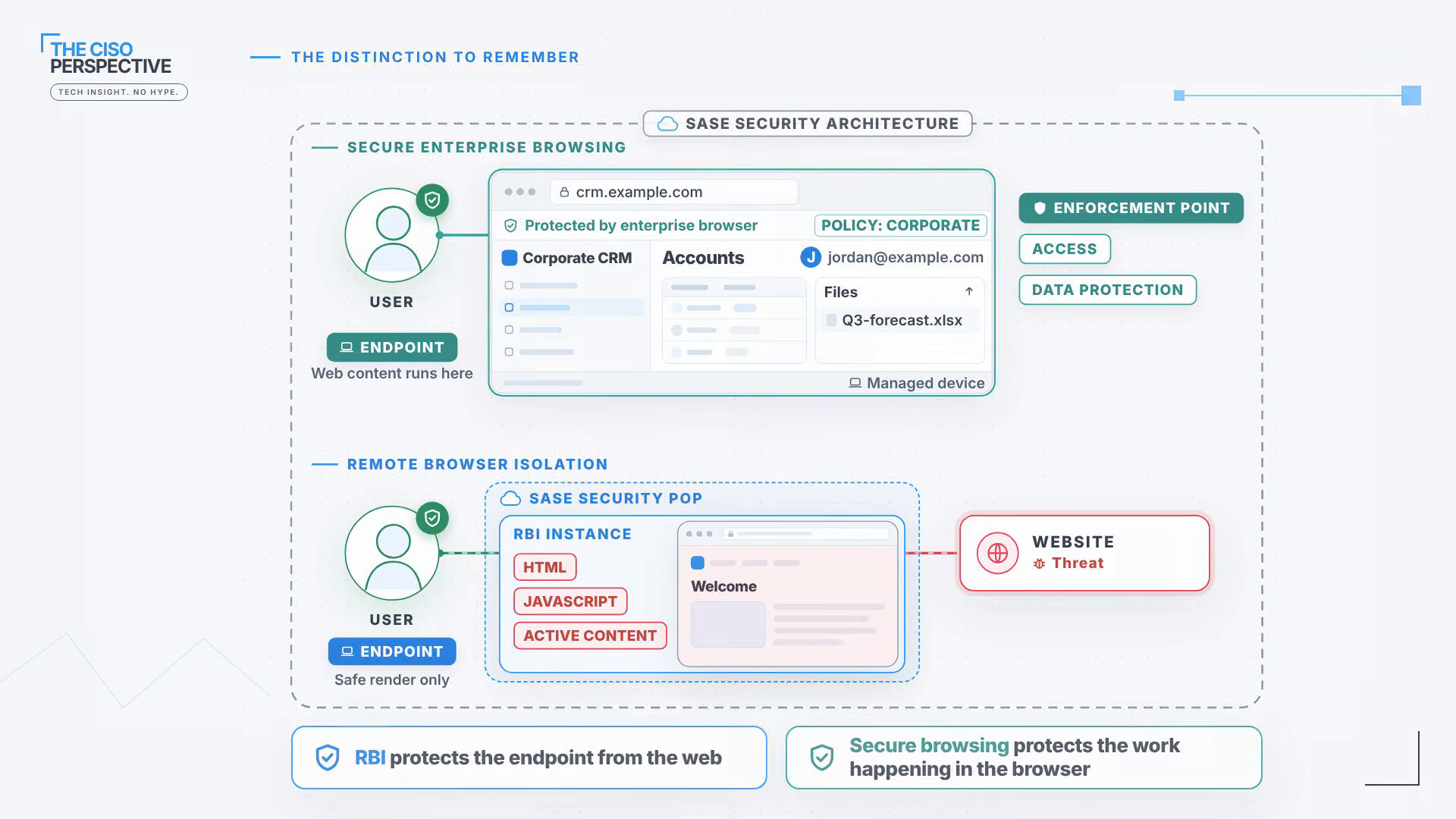
- If the web page itself is the threat, isolate it. RBI is designed to protect the endpoint from malicious web content. When a user needs to visit an unknown or high-risk site, isolation lets that content execute somewhere else, never on the user’s machine.
- If the application is trusted but you need to control the user, device or data, secure the browser. Secure enterprise browsing protects the work happening inside the browser, with visibility and policy around the user, the application, the device and the data moving between them.
Where RBI and Enterprise Browsers Fit: SASE and Gartner’s Outlook
These are not competing silos. Both capabilities are increasingly delivered as part of a broader SASE security architecture, alongside the secure web gateway and zero trust access controls many teams already run. Adoption of the browser side is moving quickly: Gartner says fewer than 10% of organizations have adopted a secure enterprise browser, and it expects 25% to deploy at least one by 2028.
If you are mapping these controls into your own architecture, these explainers cover the surrounding pieces: What Is SASE?, What Is SSE? and What Is ZTNA?
The Rule of Thumb
Both approaches are trying to reduce the same risk we started with: the human element. They just come at it from different directions. If the website is the threat, use remote browser isolation. If the application is trusted but you need to control the user, device or data inside the session, look at a secure enterprise browser or a secure browsing extension.
The distinction to remember: RBI protects the endpoint from the web. Secure browsing protects the work happening in the browser.
For the full walkthrough, including the animated RBI and secure browser flows, watch Remote Browser Isolation (RBI) vs Secure Enterprise Browser (SEB) on The CISO Perspective YouTube channel.
Sources:
- Verizon 2026 Data Breach Investigations Report, executive summary (PDF)
- CrowdStrike 2026 Global Threat Report (PDF)
- Microsoft Security Blog: Think before you Click(Fix), Aug 21, 2025
- Gartner: 25% of organizations will use secure enterprise browsers by 2028, Apr 29, 2025
- Gartner: It’s Time to Isolate Your Users From the Internet Cesspool With Remote Browsing, Sep 30, 2016
- Computerworld: Start-up emerges with an “enterprise browser”, Feb 2, 2022
Make sure to follow us across all platforms for more explainers on cybersecurity and emerging tech.


Leave a Reply