
Your remote access VPN is one of the most obvious entry points into your network, and a poorly designed VPN rollout can have catastrophic consequences. I recorded this video in April 2020, when organizations were scrambling to spin up and scale out VPNs for a suddenly remote workforce. The rush is over, but the risk is not: remote access gateways are still among the most targeted devices on the internet. In January 2024, CISA issued an emergency directive ordering federal agencies to mitigate actively exploited vulnerabilities in a major vendor’s VPN gateways.
The six considerations below come from CISA and NIST best practice guidance plus my own experience. They hold up today. Where the guidance has moved since 2020, I have added a short update for today.
One note before we start: a VPN is not the only way to give users remote access. If you are rethinking the model entirely, see my posts on accomplishing zero trust security using SDP and what ZTNA is.
1. Patch Known Vulnerabilities in Your VPN
2019 was a bad year for VPN vendors. Several of the biggest firewall and VPN vendors were hit by serious vulnerabilities, CISA released advisories on the affected products, and the NSA and the UK’s National Cyber Security Centre reported that APT groups were actively exploiting them. Advisories from that period include Cisco (cisco-sa-20191002-asa-ssl-vpn-dos), Palo Alto Networks (PAN-SA-2019-0020), Pulse Secure (SA44101) and F5 (K73183618).
That is why patching is first on the list, and the most time sensitive:
- Check that your VPN appliance and your endpoint client software are not affected by any published CVE or CISA advisory.
- If they are, patch both as soon as possible. Depending on the vendor, either side can be vulnerable.
- Assume you will be found. Automated scanning bots quickly sniff out vulnerable systems so they can be exploited later, and researchers saw a massive uptick in scanning for these exact flaws at the end of 2019 and into 2020.
Update for today: this has not changed, it has accelerated. CISA’s Emergency Directive 24-01 gave agencies 48 hours to apply vendor updates once released and warned that a sophisticated actor may establish persistence that survives a factory reset. Treat a VPN advisory as an incident, not a maintenance ticket.
2. Use Secure VPN Protocols
VPN encryption generally comes in two flavors: IPsec and SSL. Both are considered generally safe, but “SSL” covers a lot of different encryption options, some of which are outdated and unsafe.
The term SSL is often used interchangeably with TLS, but the original SSL protocol is vulnerable and should not be used under any circumstances:
- Do not use any version of SSL, TLS 1.0 or TLS 1.1 for your VPN deployment. They are susceptible to the POODLE vulnerability.
- Disable them completely. It is not enough to simply not use them. POODLE-style attacks work by exploiting backward compatibility with older versions, so they must be unsupported.
For IPsec, the best practices are:
- Use IKEv2 whenever possible.
- Avoid weak encryption algorithms such as DES and 3DES.
- Avoid weak hashing algorithms such as MD5 and SHA-1.
- Avoid Diffie-Hellman groups 1 and 2.
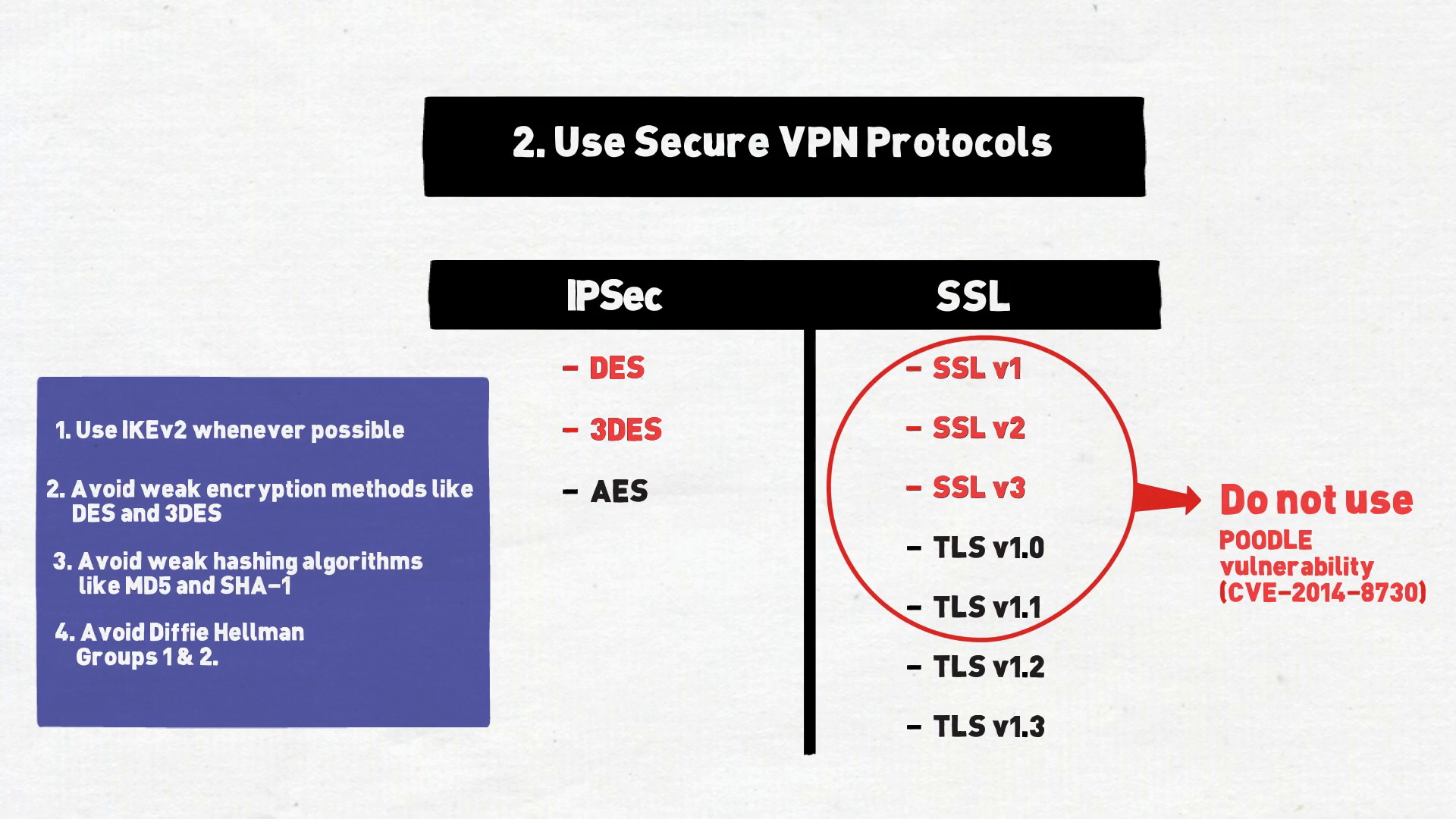
Update for today: the IETF formally deprecated TLS 1.0 and 1.1 in 2021 (RFC 8996), so TLS 1.2 is the floor and TLS 1.3 is preferred. In their 2021 joint guidance, the NSA and CISA also recommend standards-based IKE/IPsec VPNs over SSL/TLS VPNs that use custom, non-standard tunneling features.
3. Enable Multi-Factor Authentication
One of the quickest and most effective ways to harden your VPN is to turn on multi-factor authentication (MFA). Users enter their password plus another form of verification: something they have, like a hardware token or smartphone, or something they are, like a fingerprint.
For VPNs, a common choice is a token-based system, either a key fob or an authenticator app that displays a code after the password is accepted. Token-based systems are not infallible, but they are highly effective and inexpensive.
Avoid email as your second factor. Anyone who has already compromised a user’s account most likely has access to their email as well.
Update for today: attackers now routinely phish or fatigue their way past one-time codes and push prompts (I cover the techniques in Hacking Two-Factor Authentication). CISA recommends moving to phishing-resistant MFA, such as FIDO security keys or PKI-based smart cards, starting with your highest-value users and systems.
4. Use Certificates
Certificate-based authentication adds another layer of verification for your VPN clients, and it works in both directions:
- It protects the corporation. A user certificate can be revoked if an account is compromised, and a device certificate can be revoked if a laptop is lost or stolen. Someone who gets their hands on the device cannot simply brute-force their way in or log in as another user.
- It protects the user. Without certificates, a simple DNS redirect is all an attacker needs to point a client’s VPN connection at their own server, with no verification from the client. Certificates protect users from that kind of man-in-the-middle attack.
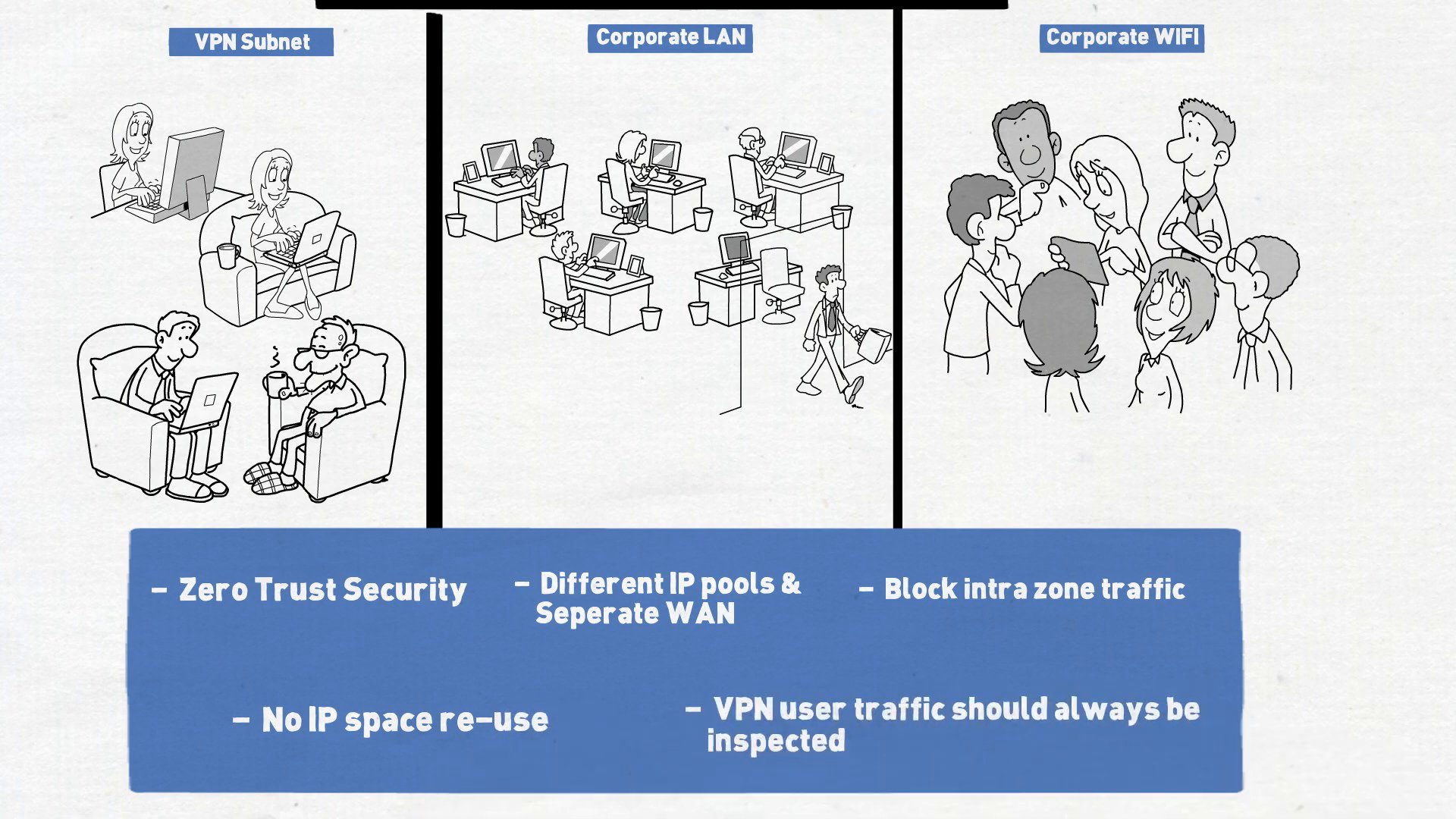
5. Segment VPN Users From the Rest of the Network
As part of good security hygiene, segment wherever possible, and that goes double for remote users:
- Put VPN users in their own IP space, with a separate IP pool and VLAN from the rest of the corporate network.
- Block intra-zone traffic, so VPN users cannot talk to each other unless it is explicitly allowed.
- Never reuse an IP range already in use on your network, and do not hide VPN users behind NAT. They should be easy to identify in your logs.
The idea is that VPN traffic always passes through an inspection point, like a firewall. That lets you apply security policy per user, for example DLP or antivirus when users access a network share, and send logs to a SIEM to detect abuse. A good use case is geolocation anomaly detection: if a user normally logs in from Atlanta and suddenly logs in from Beijing, an alert should fire and the account should be automatically quarantined.
6. Avoid Split Tunneling
VPN connectivity works in one of two modes:
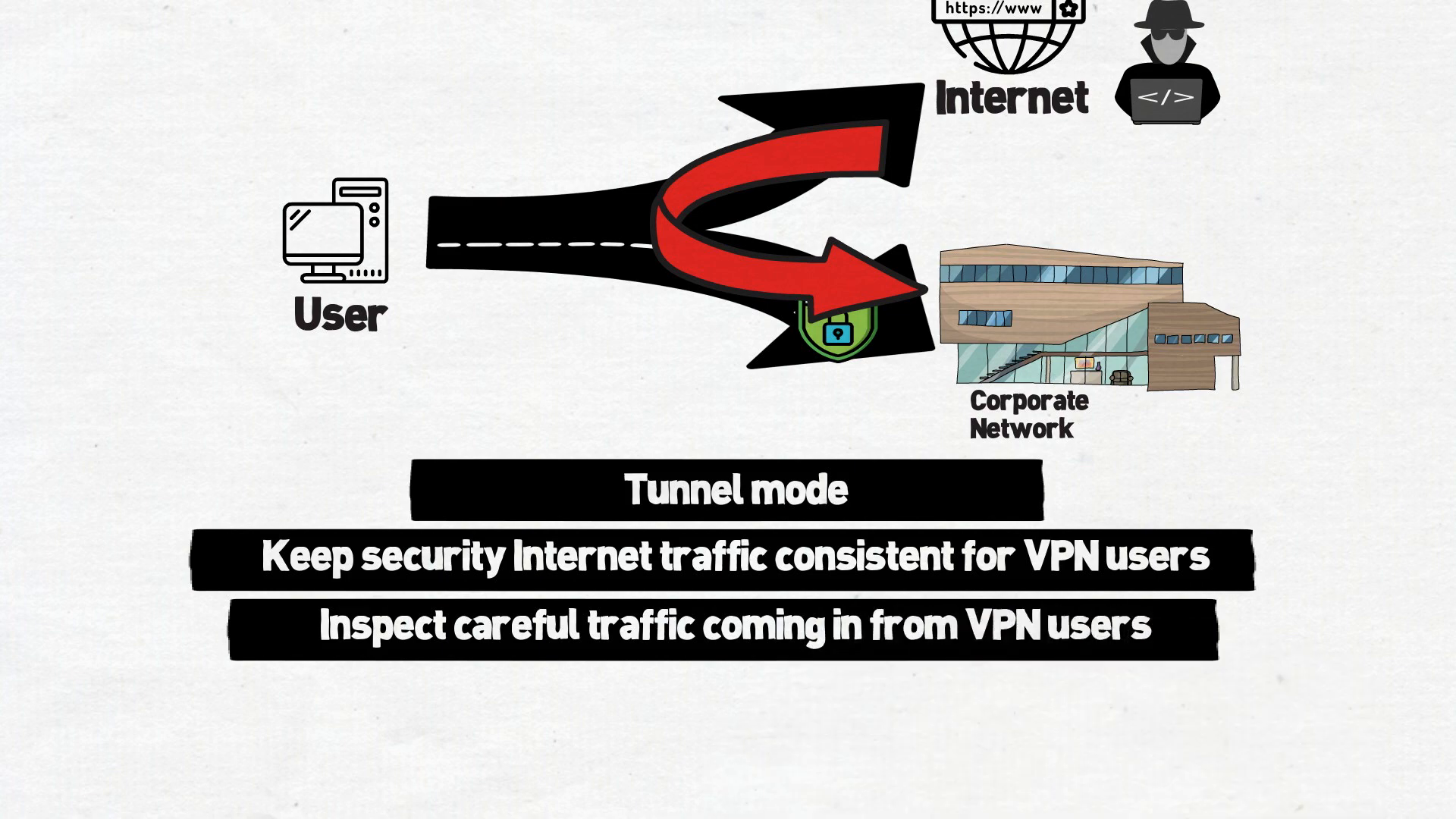
- Tunnel mode (full tunnel): once connected, all of the user’s traffic goes through the VPN.
- Split tunneling: only traffic for networks you specify goes through the tunnel into the corporate network. Everything else goes straight to the internet.
Split tunneling is tempting because it lowers throughput requirements at your corporate edge. But with split tunneling you have bridged two networks, the untrusted internet and your corporate network, through the user’s device. If the user is on an insecure network, like a coffee shop, that becomes an even bigger problem.
Use always-on tunnel mode wherever possible. Treat outbound web traffic just like any other corporate traffic and keep security policy consistent for everyone. And be particularly cautious about any traffic coming into the network from VPN users.
Update for today: the principle behind this one, the same security policy for internet traffic no matter where the user sits, is exactly what SASE and SSE platforms now deliver from the cloud instead of backhauling everything to headquarters. See What Is SASE? and What Is SSE?
VPN Security Checklist
- Patch your VPN appliances and endpoint clients against every published advisory, fast.
- Use secure protocols: IKEv2 for IPsec, no SSL, TLS 1.0 or 1.1, and no DES, 3DES, MD5, SHA-1 or DH groups 1 and 2.
- Enable MFA, never email-based, and move toward phishing-resistant MFA.
- Use certificates for both users and devices.
- Segment VPN users into their own IP space and inspect their traffic.
- Avoid split tunneling and keep internet security policy consistent.
For the full walkthrough, watch Securing Your VPN: Six Considerations on The CISO Perspective YouTube channel.
Sources:
- NSA and CISA: Selecting and Hardening Remote Access VPN Solutions (PDF), Sep 2021
- CISA: Emergency Directive 24-01, Mitigate Ivanti Connect Secure and Ivanti Policy Secure Vulnerabilities
- IETF RFC 8996: Deprecating TLS 1.0 and TLS 1.1
- CISA: Implementing Phishing-Resistant MFA (PDF)
- NVD: CVE-2014-8730 (POODLE for TLS)
- Cisco Security Advisory: cisco-sa-20191002-asa-ssl-vpn-dos
- Palo Alto Networks Security Advisory: PAN-SA-2019-0020
- Pulse Secure Security Advisory: SA44101
- F5 Security Advisory: K73183618
Make sure to follow us across all platforms for more explainers on cybersecurity and emerging tech.


Leave a Reply