
Security is steadily moving off the appliance and into the cloud. Services like SASE and Secure Web Gateway (SWG) now handle inspection that used to live in a branch firewall, and Gartner expects that by 2028, 70% of SD-WAN purchases will be part of a single-vendor SASE platform offering.
That raises a fair question: is cloud-delivered security always the better option? Not necessarily. Both models can deliver the same core capabilities, but where each function runs has a real impact on security effectiveness and user experience. Some controls are still best enforced locally; others clearly benefit from the cloud.
Below, 13 capabilities commonly associated with SASE and next-generation firewalls (NGFWs) are compared one by one and placed where each works best: on-premises, in the cloud, or across both. For the short version, grab the On-Prem vs SASE cheat sheet.
Two Architectures: On-Premises vs Cloud-Delivered Security
On-premises security is typically associated with edge devices such as an SD-WAN appliance or a next-gen firewall at a corporate location. Security inspection happens locally, so traffic can be inspected and controlled before it leaves the network or moves across internal network segments.
Cloud-delivered security is typically associated with SASE or a Secure Web Gateway. In this approach, corporate traffic is commonly tunneled to a cloud point of presence (PoP) for security inspection. The corporate location handles basic connectivity and filtering, while more advanced security inspection is sent to the cloud. Remote users can connect directly to cloud security through an endpoint agent, so policies are enforced whether they are on or off the corporate network.
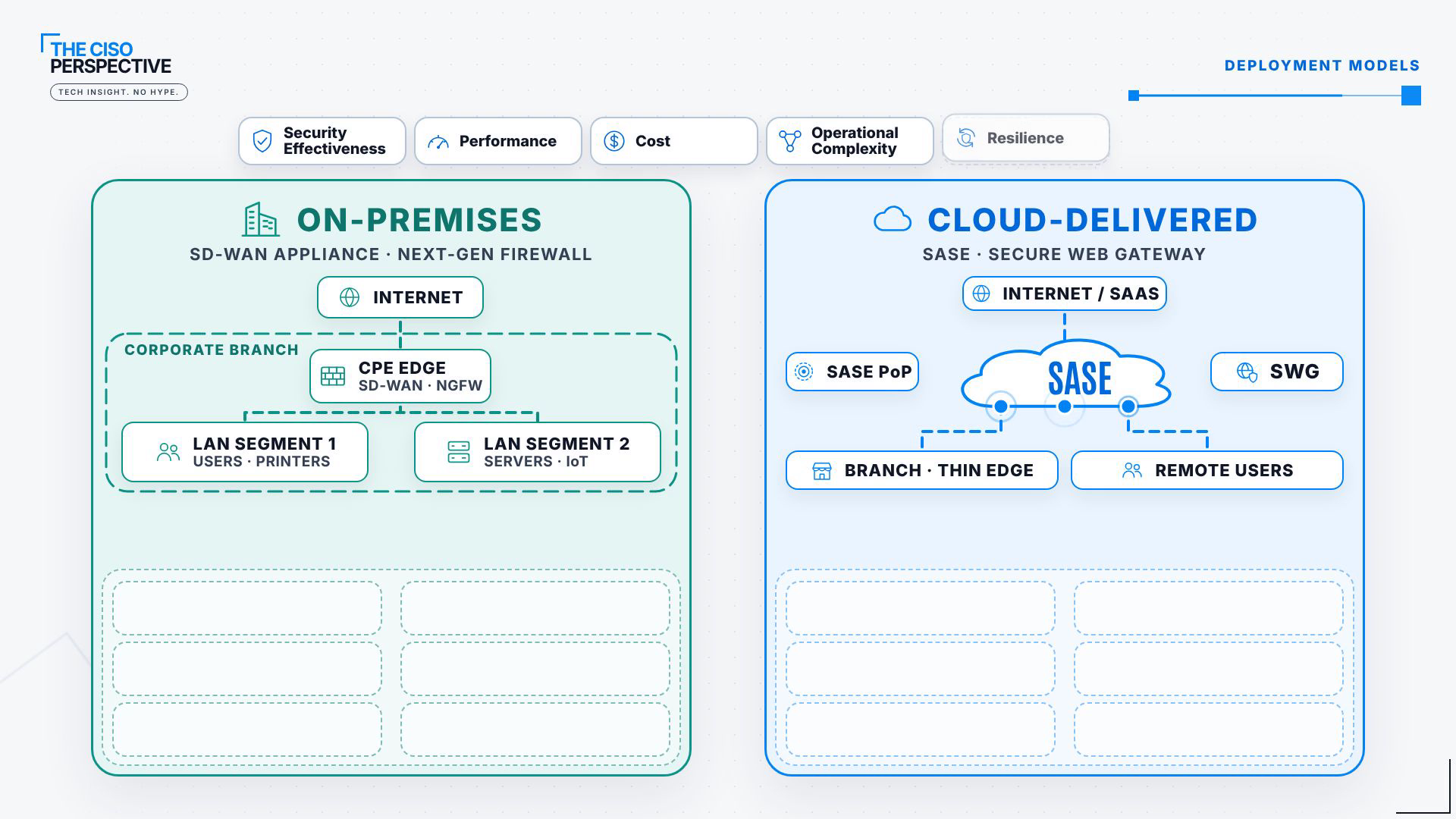
Five factors shape the choice between them: security effectiveness, performance, cost, operational complexity and resilience. The comparison below weighs security effectiveness first, and performance where it makes a meaningful difference. Each capability lands in one of three buckets: on-premises, cloud-delivered, or hybrid.
Part A: Network Security and Threat Prevention
Antivirus and Malware Protection: On-Premises (If Detection Is Comparable)
The job here is to catch malicious content before it reaches the endpoint, and the general rule is to inspect as close to the source as practical. A capable on-premises appliance can scan files locally instead of detouring traffic through a cloud service, which can help both performance and security effectiveness.
The catch is detection capability. Some SD-WAN and NGFW appliances carry smaller signature databases and still lean heavily on cloud lookups, so don’t assume protection is equivalent across platforms. Where detection is comparable, proximity to the source gives on-premises the edge.
Web and URL Filtering: Hybrid
Both models can enforce policy on web categorization, reputation and security risk. What differs is where enforcement happens.
An on-premises firewall enforces locally, though uncached site ratings may still need a cloud lookup. A cloud-delivered model sends web traffic through the SASE PoP, which can add latency for traversal, connection setup and inspection. How much depends on the PoP’s proximity and connectivity, especially between users and the application. Both approaches protect effectively, so web filtering is hybrid.
DNS Security: Hybrid
DNS filtering stops users and devices from resolving known malicious domains, cutting off some threats before an application connection even starts. DNS queries are lightweight compared with full web inspection, so performance is less of a concern. Policy can be enforced locally, in the cloud, or both, and the two models complement each other well. DNS security is hybrid.
Application Control: On-Premises
Application control, sometimes called Layer 7 application filtering, identifies applications and enforces policy based on the application layer itself, instead of relying only on Layer 3 and Layer 4 information such as IP address or port.
Local enforcement matters most for local traffic. Users reaching printers, file servers or internal applications generate traffic that may never pass through a cloud security service, and a local firewall can inspect and control it without sending it outside. SASE platforms offer similar capabilities, but their view of local traffic depends on the endpoint agent and on whether that traffic is routed through the service at all. For local application control, on-premises wins.
Network Firewall and Local Segmentation: On-Premises
Most SASE deployments still need a branch device, often called a thin edge or CPE, to connect to the PoP. These devices may handle basic firewalling, but not all match a next-gen firewall’s application inspection, segmentation or advanced security. That gap shows up when protecting internal segments, because local traffic should never have to leave the organization just to enforce policy. Firewalling and local segmentation stay on-premises.
Intrusion Prevention (IPS): On-Premises
IPS inspects traffic for exploit attempts and malicious activity, shielding vulnerable applications, services and devices. Cloud SASE can run IPS on traffic routed through its infrastructure, but it may miss direct inbound connections and traffic moving between internal segments. A local IPS sees those connections at the network boundary, including traffic bound for internally hosted applications that may have no endpoint agent. To protect corporate infrastructure and internal resources, keep IPS on-premises.
IoT and OT Security: On-Premises
Security cameras, printers, industrial controllers and manufacturing equipment are still common, and many are old devices with limited security. They can’t run endpoint agents or use explicit proxies, and they mostly talk to local resources, so cloud-only inspection can leave important traffic outside the inspection path. Local segmentation, access control and intrusion prevention protect these assets directly, with no dependency on an external cloud connection. IoT and OT protection belongs on-premises.
Part B: Secure Access and Data Protection
Part A was about network traffic and local resources. Once the focus shifts to application access, SaaS platforms and sensitive data, the balance tips toward cloud-delivered security.
Zero Trust Network Access (ZTNA): Hybrid
ZTNA grants access to specific applications based on user identity, device posture and other context. Delivered from the cloud, it acts as a central access broker that connects distributed users to applications without exposing the underlying network or requiring a traditional VPN. Applications hosted in corporate environments still need an enforcement point, either local or through a cloud-connected broker. Because the right design depends on where applications live and where users connect from, ZTNA is hybrid.
Cloud Access Security Broker (CASB): Cloud-Delivered
CASB gives visibility and control over how users work in SaaS applications: uploading files, sharing documents, accessing sensitive information. Some of that can be enforced inline from a local device, but CASB can also plug directly into SaaS applications through cloud-native APIs, exposing stored files, sharing permissions and activity that never touch the corporate network. Those integrations make CASB a cloud-delivered capability.
Data Loss Prevention (DLP): Cloud-Delivered
DLP finds sensitive information and helps prevent unauthorized exposure, whether data sits locally, crosses the network or is shared through a SaaS application. Many next-gen firewalls include basic DLP, but a dedicated cloud platform adds data classification, contextual policies and SaaS integration. That matters most when distributed users work across multiple cloud applications. Local and endpoint DLP still have a role; for advanced, SaaS-focused data protection, cloud-delivered is the better fit.
Remote Browser Isolation (RBI): Cloud-Delivered
RBI runs the browsing session in an isolated environment and sends a safe representation back to the user, so potentially dangerous web content never executes on the endpoint. On-premises options exist, but a cloud provider can operate and scale the isolation infrastructure centrally, sparing organizations from running it at every location. RBI is cloud-delivered. (For a deeper look, see Remote Browser Isolation vs Secure Enterprise Browser.)
Part C: SaaS and Cloud Security Posture
The last two capabilities protect cloud applications and data without inspecting network traffic at all.
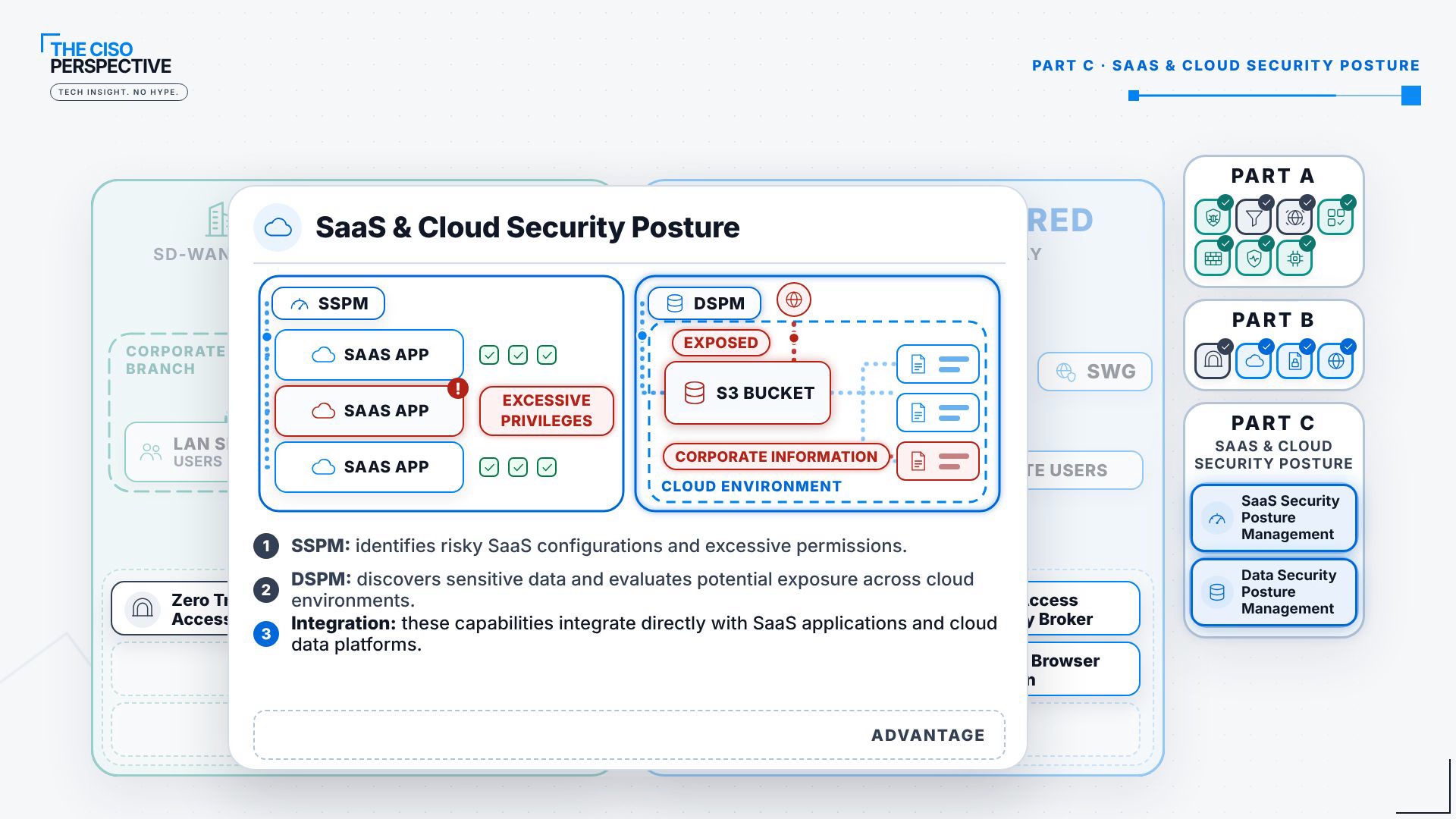
- SaaS Security Posture Management (SSPM) identifies risky SaaS configurations and excessive permissions.
- Data Security Posture Management (DSPM) discovers sensitive data and evaluates its potential exposure across multiple cloud environments.
Both work directly with SaaS applications and cloud platforms, so SSPM and cloud-focused DSPM are cloud-delivered.
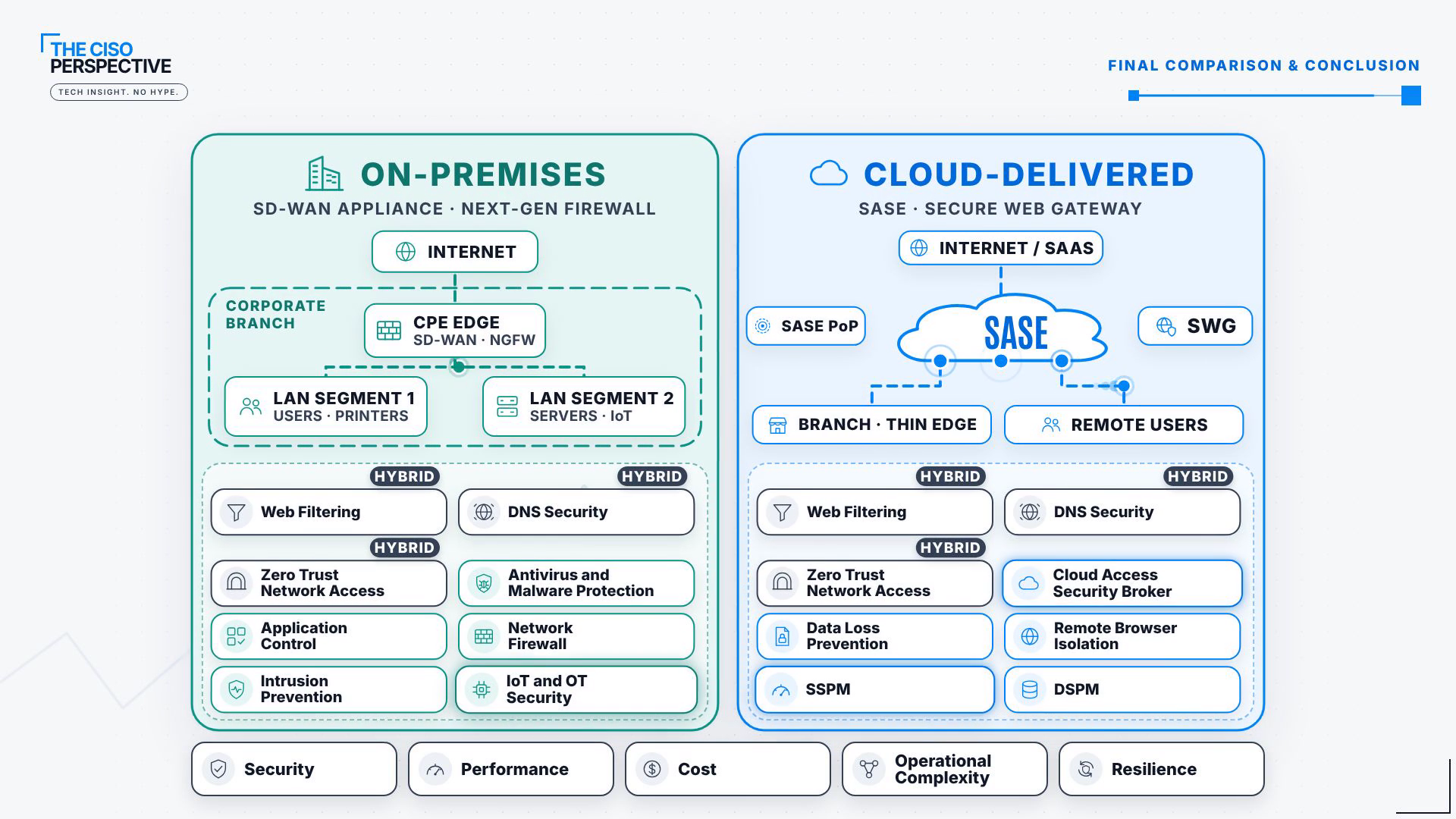
The Final Comparison: What Stays Local and What Moves to the Cloud
| On-premises | Hybrid | Cloud-delivered |
|---|---|---|
| Antivirus and malware protection (if detection is comparable) | Web and URL filtering | CASB |
| Application control | DNS security | Data loss prevention (DLP) |
| Network firewall and local segmentation | Zero Trust Network Access (ZTNA) | Remote browser isolation (RBI) |
| Intrusion prevention (IPS) | SSPM | |
| IoT and OT security | DSPM |
Put side by side, the pattern is clear. Core network security functions often benefit from local enforcement, particularly for branch offices, internal applications and connected devices. Cloud-delivered security wins where a capability depends on SaaS or cloud integrations, or gains from centralized infrastructure and cloud-native connectivity. Several functions work well either way, depending on where users, applications and data are located.
Security effectiveness and performance are only part of the decision. Cost, operational complexity and resilience weigh just as heavily when it is time to buy.
The Takeaway
Moving inspection to the cloud doesn’t automatically make it better, and keeping everything on-premises won’t deliver every capability organizations now expect. The question isn’t on-prem or SASE. For many enterprises, the strongest architecture combines both, placing each capability where it provides the greatest benefit.
For the animated walkthrough, see On-Prem vs SASE on The CISO Perspective YouTube channel, and grab the full-quality On-Prem vs SASE cheat sheet for the verdict map, key terms, a decision checklist and links to every chapter. New to the topic? Start with What Is SASE?, then SSE vs SASE vs VPNs and SASE Deployment Models: Cloud vs. Sovereign SASE Explained.
Frequently Asked Questions
Is cloud-delivered SASE always better than on-prem security?
No. Both can offer the same core capabilities, but where each function runs affects security effectiveness and user experience. Local enforcement still makes more sense for some capabilities, and cloud-delivered security has clear advantages for others.
Which security capabilities are best kept on-premises?
Antivirus and malware protection (if detection is comparable), application control, network firewall and local segmentation, intrusion prevention, and IoT and OT security. All of them benefit from seeing local, inbound and internal traffic that may never reach the cloud.
Which capabilities work best cloud-delivered?
CASB, DLP, remote browser isolation, SSPM and DSPM. They depend on SaaS and cloud integrations or on centrally operated, scalable infrastructure.
Why are web filtering, DNS security and ZTNA hybrid?
Both approaches work well for them. The better fit depends on PoP proximity and on where your users, applications and data are located.
Sources:
Make sure to follow us across all platforms for more explainers on cybersecurity and emerging tech.



Leave a Reply